Pocket DJ Drum Machine
A pocket-sized, sample-based drum machine built on a Teensy 4.1 — eight voices, a 16-step sequencer, and eight arcade pads you can play one-handed over a DJ set. It’s finished: drilled, wired, screwed shut and playing, with a browser app that programs it and adds reverb, echo and a filter sweep down the USB cable.
Why I built this
I DJ, and every set hits the same wall: the drums are baked into the track, so you can groove with the mix but can’t play anything on top of it. The drum machines I like are either studio gear that won’t fit in a DJ bag or software that means staring at a laptop instead of the crowd. I wanted something pocket-sized and physical enough to play one-handed with the other hand on a fader. It’s also my first real embedded project.
What it does
Tap one of eight pads and you get a sample: kick, snare, clap, hats, percussion, crash. In Perform mode the pads work like a finger drum kit, and holding one rolls it in time with the beat. Edit mode turns them into a 16-step sequencer with eight patterns, per-track mutes, accented steps and live recording, all saved to the machine’s memory so a groove survives a power cycle.
Two knobs matter most. Density thins or fills the whole pattern, keeping the quarter-note downbeats and dropping the 16ths first, so it never collapses into noise. Chaos plans a bar of variation in advance, adding ghost notes and dropping hits, clustered at the end of the bar so it resolves onto a clean downbeat. Three buttons and four knobs are the whole control surface.
Chaos replaced a swing control that proved musically useless every time I reached for it, a call I made eight days after the acrylic panel had gone to the laser cutter. So the fourth knob is engraved SWING and always will be, while the firmware behind it does chaos. Hardware has a longer lead time than software, and the front panel is the receipt.
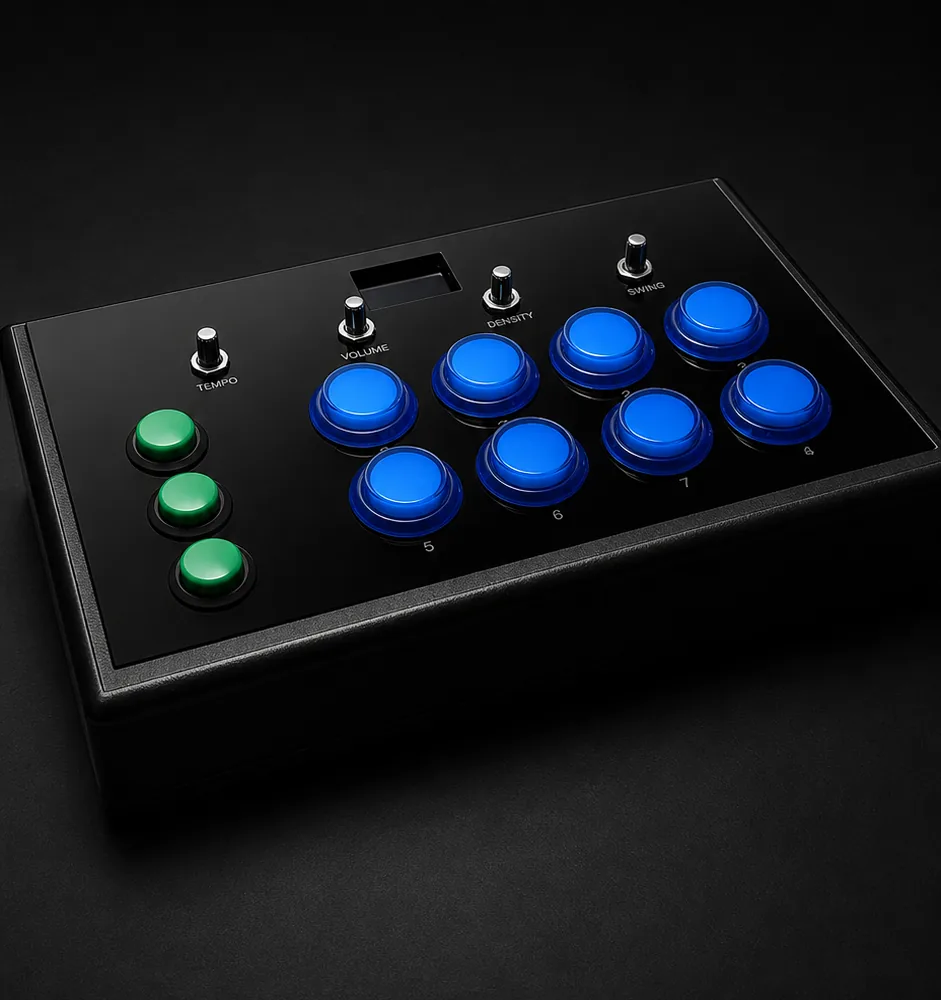
The finished instrument. The knob marked SWING runs the chaos engine.
Underneath, a Teensy 4.1 drives an audio board, an OLED and USB MIDI in both directions. All the musical logic is plain C++ that runs and tests on my Mac, 162 tests of it, so the musical behaviour was right before I wired a single pin.
Into the box
Turning a bare board into an instrument meant drilling a plastic case, mounting eleven buttons, four pots and a screen behind a laser-cut acrylic facing, and building a harness that can be assembled by hand and taken apart again: lever connectors and push-fit terminals, no soldering past the audio board.
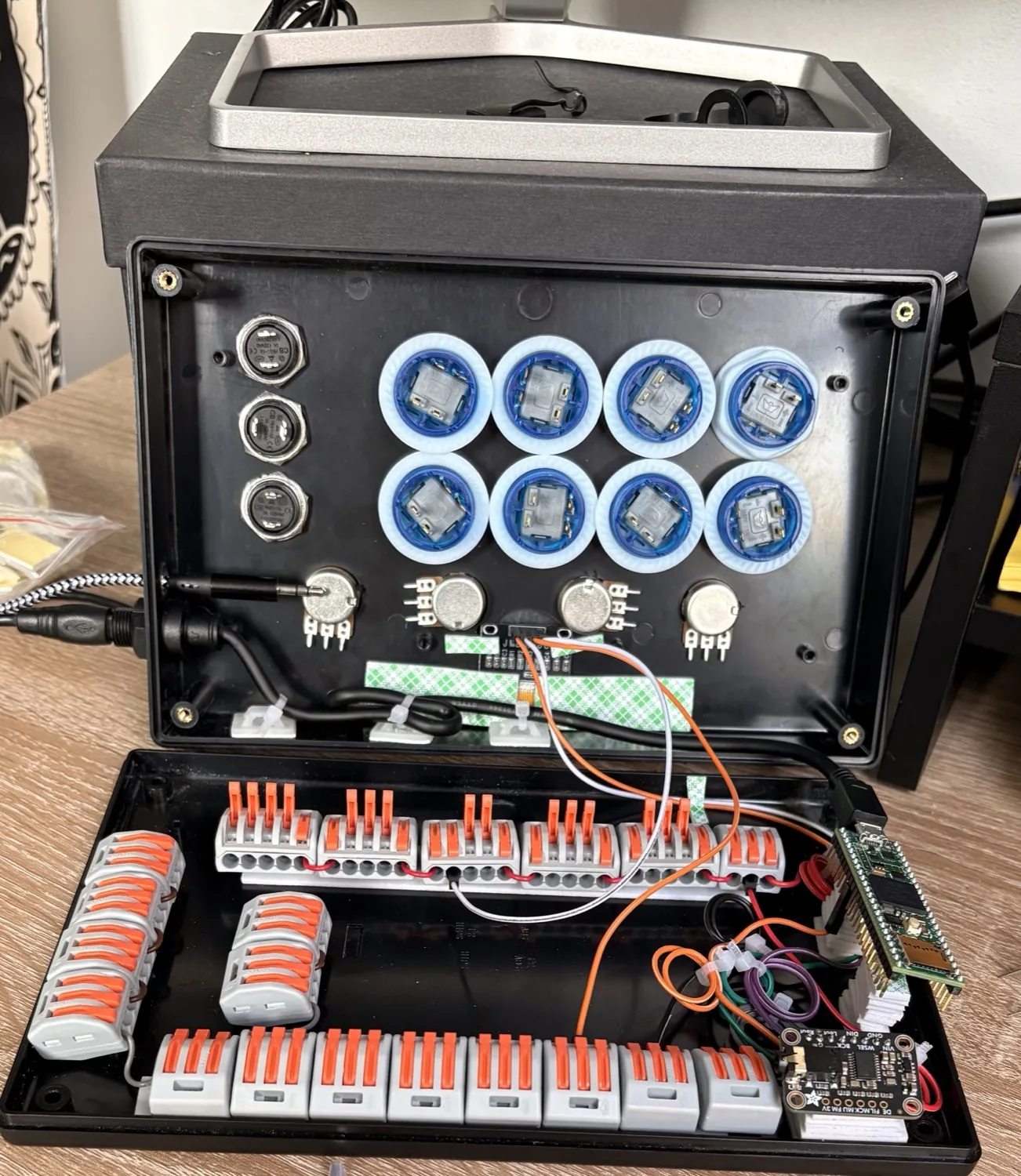
Mid-assembly. Controls in the drilled lid, brain and power buses in the base.
Then the box wouldn’t shut. Screwing the base down pressed on the backs of the arcade buttons and held every pad down: each crimped connector and its bent wire hung nearly a centimetre below its button. Bending them flat on all eight pads bought the height back. Dropping the pad lighting took sixteen wires out, and the ground bus shrank to the seven taps it needed; the LED firmware is written, tested and does nothing.
All four pots also went in wired backwards. The honest fix is eight wires; I fixed it in one line of firmware, because by then the box only just closed. None of this was in the design spec. The number that mattered, how far a crimped connector hangs below a button, was one I never thought to measure.
Driving it from a laptop
Plug in the USB cable and the machine shows up as a serial port, so I wrote a browser app that listens: no install, no dependencies, talking to the hardware directly. The live view shows what the machine actually fires rather than what’s programmed, since density and chaos keep the two apart. It is read-only down to the spacebar, because a stray keystroke stopping the beat mid-set is the worst thing this could do.
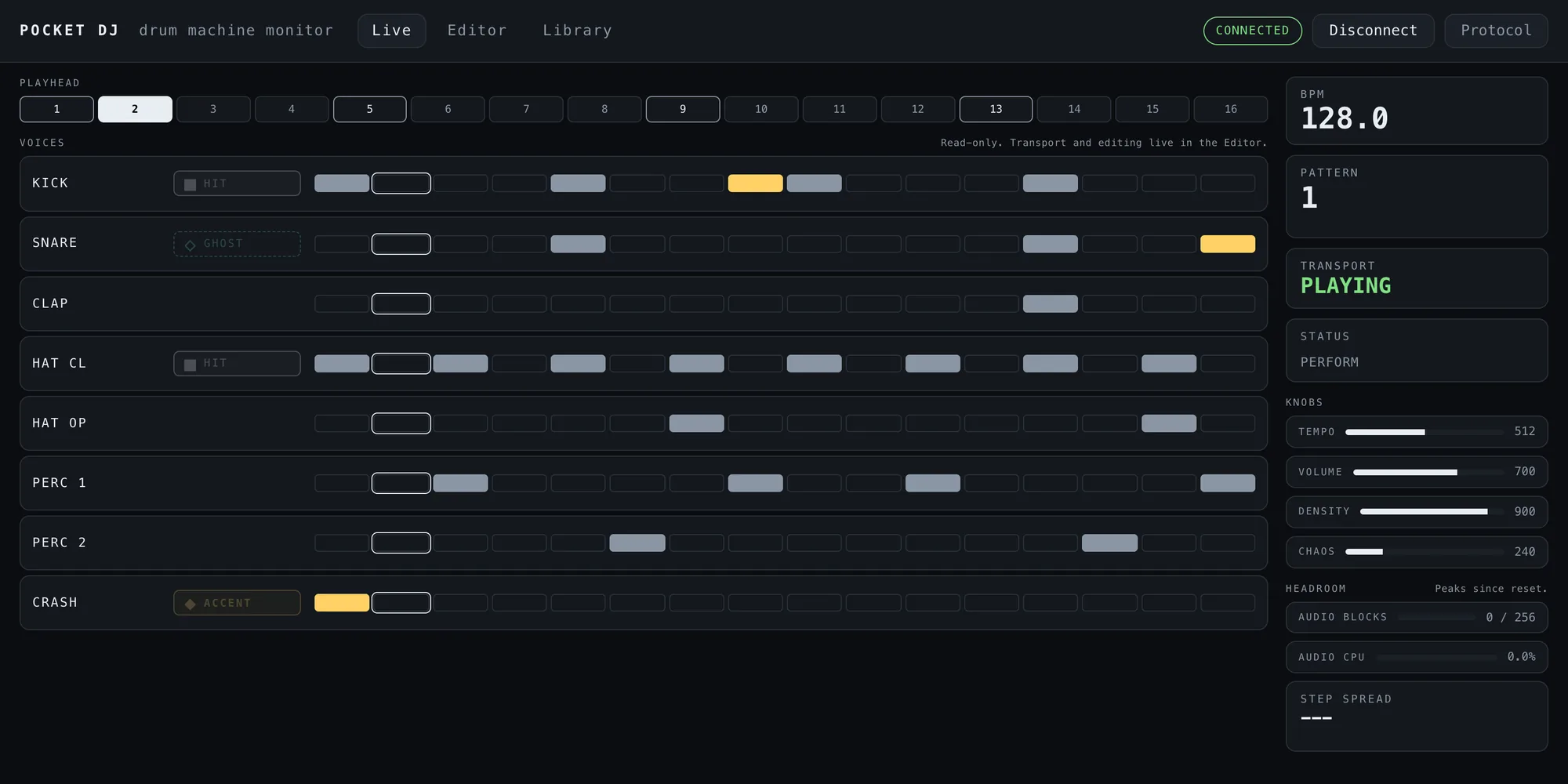
Live view — read-only, showing what fired rather than what’s programmed.
The editor is an eight-by-sixteen grid with copy, paste, undo and set lists. The device is the only source of truth, so a cell moves when the machine says it moved, not when I click. A simulator stands in for the cable, handshake and timeouts included, which is how the whole app was written while the instrument sat in a box waiting for its panel. Both views worked first time on the day there was something to plug into.
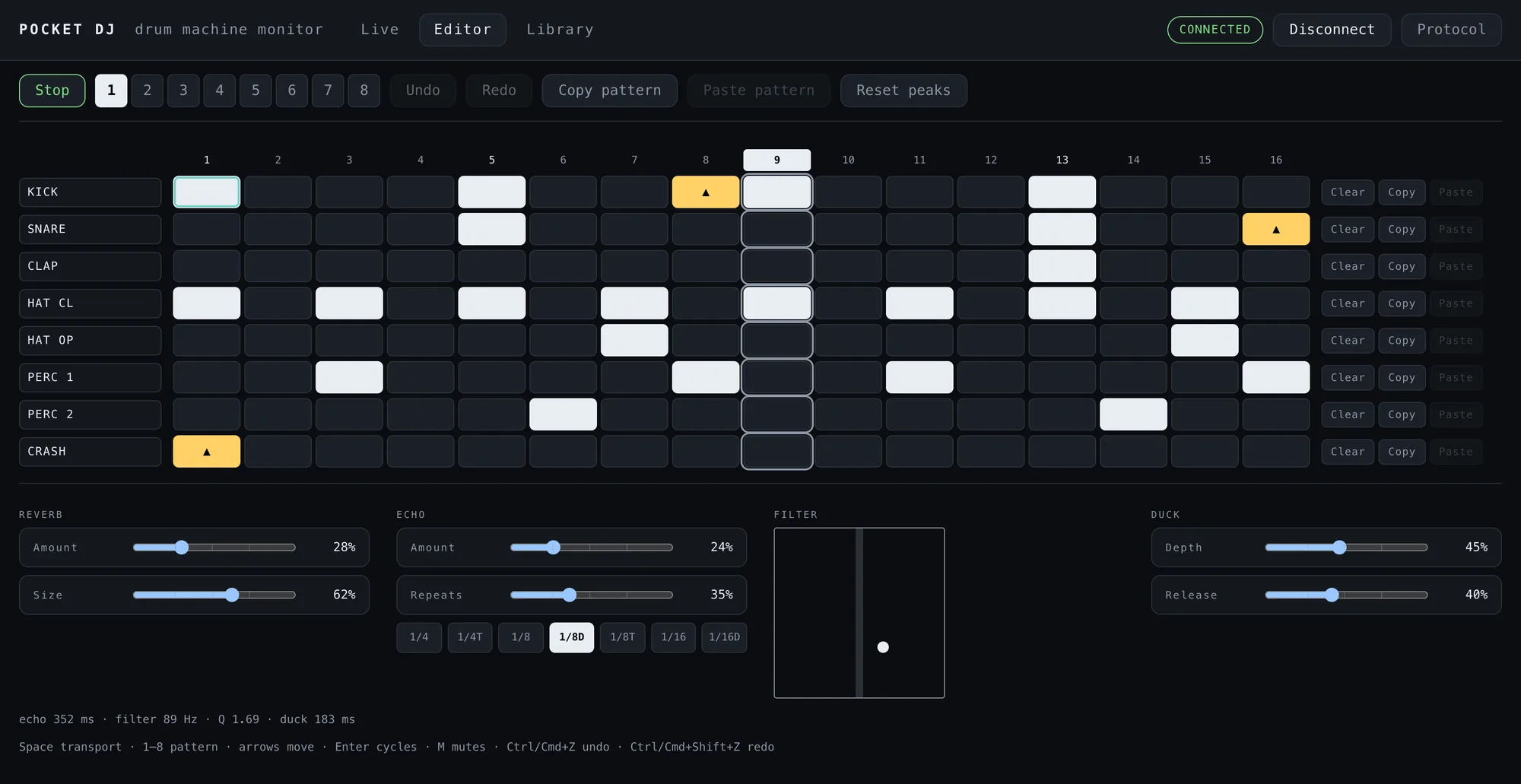
Pattern editor, with the effects panel underneath.
The effects live here too, because all four knobs were taken and I wasn’t reopening the box for a fifth. Reverb, echo and a DJ-style filter sit in a panel under the editor. The filter comes after everything else, so a sweep drags the reverb and echo tails down with the drums. Nothing is saved: with no laptop the machine boots dry, which is why I was comfortable with no escape hatch on the panel.

The effects panel. The echo is set in note lengths, not milliseconds, so it stays with the tempo.
Two things I only found by ear. Reverb and echo both at maximum tear the output: four full-volume signals summing into one mixer. And a quarter-note echo over a four-on-the-floor kick smeared, because each repeat landed a couple of milliseconds from the next live kick. The chip starts a live hit at the next audio block, which was always true and never audible until the echo exposed it. The default echo interval now falls between the hits.
The hard part
The tempo knob’s range turned out to be a musical decision. Cheap pots are noisy, so the firmware ignores small movements, and that ignored slice is a fixed fraction of the knob’s travel: the wider the BPM range, the coarser every nudge. At 80–160 BPM a single step was too big to beatmatch a record by hand. Narrowing it in stages to 120–140, the range I actually play in, and measuring the noise inside the closed box rather than on a breadboard, took the smallest nudge from 0.78 BPM to 0.23.
Tightening that slice broke something else. A pot never quite reads zero at its end stop, so the firmware snaps it once it’s close enough, and “close enough” had been defined as twice the ignored slice. Shrinking one halved the other, to less than where the tempo knob rests, and the tempo wandered between 110.0 and 111.1 BPM with my hand nowhere near it. It looked like a clock problem; it was the knob. Two numbers had been tied together because both were about pots, when one describes electrical noise and the other a lump of plastic against a stop.
Where it’s at
- Built, closed and playing into a mixer over a 3.5 mm cable: ten minutes of continuous play in the sealed box, across patterns, with clean audio
- The whole control surface works from the panel: perform mode, sequencer, accents, live recording, bar-quantised pattern switching, mutes, hold-to-roll, density and chaos
- Reverb, echo and filter verified on the finished machine, with the processor 97% idle running all three
- Step timing measured on the finished machine with the laptop streaming: 152 µs of spread across 799 steps
- All eight slots hold a progressive techno set, written from the laptop and read back to check. USB MIDI works both ways, and the self-test passes on every control
- Cut, not pending: pad lighting. Sixteen more wires wouldn’t fit, and the live view already shows more than the pads could, including the ghost notes chaos adds
What’s next
Point the set-list library at the real machine, carefully. It has only ever talked to the simulator, and it can overwrite all eight patterns in one go, so it starts by snapshotting what’s already there.
Fix a habit of mine: live recording writes straight to memory, and two patterns drifted in the first session of playing it, so I check the record light before I jam. Then the thing I built it for: layering it live over a DJ set.